Showing posts with label beta. Show all posts
Showing posts with label beta. Show all posts
Sunday, March 30, 2014
Download Free Software VirtualBox 4 3 0 Beta 1
VirtualBox is a general-purpose full virtualizer for x86 hardware. Targeted at server, desktop and embedded use, it is now the only professional-quality virtualization solution that is also Open Source Software.
.jpg "Download Free Software VirtualBox 4.3.0 Beta 1")
.jpg "Download Free Software VirtualBox 4.3.0 Beta 1")

Thursday, November 28, 2013
UTTER! VOICE COMMANDS BETA
Welcome to the BETA release of utter! Your offline voice controlled personal assistant with a difference...
What makes utter! different?
utter! is not your average Siri clone and doesn’t attempt to be a gimmick of a virtual assistant application, its priority is to be super functional and ultra fast! It allows many device based commands to be performed offline, without the need for a data connection (Jelly Bean only).

utter! runs in the background of your device, is very lightweight on resource and does not have a user-interface, so its functions are available anywhere on the device, at any time, to interact with any application.
With highly optimised algorithms, utter! aims to make voice control on your device, something you wonder how you ever did without! Something that is achieved faster than you could do it manually and an implementation that takes full advantage of the openness of the Android Platform, by giving you full device control in addition to using the functions in your favourite installed applications.
There’s no need to open up a separate application to execute your voice commands. With just a shake, wave, or a good old fashioned button press, utter! wakes to address you as you see fit, wherever you are on your device, whatever you are doing.. and it won’t get in the way.
So, please do get involved in the testing stage, give me your feedback and help me create a Voice Controlled Personal Assistant that is truly useful! One that makes fast offline voice recognition for Android a reality!
User guide link - http://goo.gl/aah2X
[FUNCTIONS]
• Wake-up-phrase
• WiFi
• Bluetooth
• Mobile Data
• GPS
• NFC
• Hotspot
• Airplane mode
• Orientation
• Keyboard
• Driving mode
• Notifications
• Time
• Alarms
• Calendar
• Email
• Text
• Facebook
• Twitter
• Foursquare
• Spelling
• Weather
• Application Integration
• Device Settings
• Device Information
• Web Search
• Video Search
• Application Search
• Music
• Navigation
• Location Services (limited release)
• Contacts
• Calling (+Skype)
• Flash light
• Tasker Integration
• File Management (limited release)
• Root Functions
• Knowledge Base (coming very soon)
• Plus Many More…….!
SCREENSHOTS:


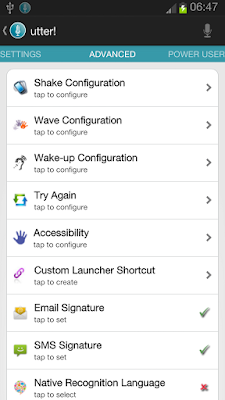


What makes utter! different?
utter! is not your average Siri clone and doesn’t attempt to be a gimmick of a virtual assistant application, its priority is to be super functional and ultra fast! It allows many device based commands to be performed offline, without the need for a data connection (Jelly Bean only).

utter! runs in the background of your device, is very lightweight on resource and does not have a user-interface, so its functions are available anywhere on the device, at any time, to interact with any application.
With highly optimised algorithms, utter! aims to make voice control on your device, something you wonder how you ever did without! Something that is achieved faster than you could do it manually and an implementation that takes full advantage of the openness of the Android Platform, by giving you full device control in addition to using the functions in your favourite installed applications.
There’s no need to open up a separate application to execute your voice commands. With just a shake, wave, or a good old fashioned button press, utter! wakes to address you as you see fit, wherever you are on your device, whatever you are doing.. and it won’t get in the way.
So, please do get involved in the testing stage, give me your feedback and help me create a Voice Controlled Personal Assistant that is truly useful! One that makes fast offline voice recognition for Android a reality!
User guide link - http://goo.gl/aah2X
[FUNCTIONS]
• Wake-up-phrase
• WiFi
• Bluetooth
• Mobile Data
• GPS
• NFC
• Hotspot
• Airplane mode
• Orientation
• Keyboard
• Driving mode
• Notifications
• Time
• Alarms
• Calendar
• Text
• Foursquare
• Spelling
• Weather
• Application Integration
• Device Settings
• Device Information
• Web Search
• Video Search
• Application Search
• Music
• Navigation
• Location Services (limited release)
• Contacts
• Calling (+Skype)
• Flash light
• Tasker Integration
• File Management (limited release)
• Root Functions
• Knowledge Base (coming very soon)
• Plus Many More…….!
SCREENSHOTS:


Tuesday, November 12, 2013
Focal Beta v1 0 1 apk download
Focal (Beta) v1.0.1 apk download

Focal is a fully featured camera app looking to provide the most features on the most phones possible, including device-specific features on some devices.
This app is the official release from the ex-CyanogenMod app.
It features:
- A photo and video mode, supporting many features (burst mode, timer mode, scene mode, shutter speed on Sony devices, ...)
- A panorama mode, currently semi-broken
- A PicSphere mode, open-source replacement of Googles PhotoSphere, to do 360° sphere shots
- A review drawer, by sliding from the top of the screen (in portrait). It shows your latest pictures.
Within photograph mode, you need to gain access to to a couple instruments, like intelligent snapshot improvement (auto-awesome), or maybe a rule regarding thirds overlay. Upon several products, configurations like Color change, HDR along with a manual light measure position may also be accessible. Double tapping your monitor may put your in swift shot mode, where by tapping your monitor anywhere requires images.
Within video clip mode, high-framerate video clip is usually doable.
Points:
- You possibly can slide any widgets eventually left cope with to the to in close proximity the idea
- You possibly can swipe a second time to be able to in the short term obscure wide open widgets, and swipe time for restore all of them
- You can pin widgets on your main screen
- You can scroll the sidebar
Whats New
- Fixed PicSphere rendering


Download 13mb apk via
This app is the official release from the ex-CyanogenMod app.
It features:
- A photo and video mode, supporting many features (burst mode, timer mode, scene mode, shutter speed on Sony devices, ...)
- A panorama mode, currently semi-broken
- A PicSphere mode, open-source replacement of Googles PhotoSphere, to do 360° sphere shots
- A review drawer, by sliding from the top of the screen (in portrait). It shows your latest pictures.
Within photograph mode, you need to gain access to to a couple instruments, like intelligent snapshot improvement (auto-awesome), or maybe a rule regarding thirds overlay. Upon several products, configurations like Color change, HDR along with a manual light measure position may also be accessible. Double tapping your monitor may put your in swift shot mode, where by tapping your monitor anywhere requires images.
Within video clip mode, high-framerate video clip is usually doable.
Points:
- You possibly can slide any widgets eventually left cope with to the to in close proximity the idea
- You possibly can swipe a second time to be able to in the short term obscure wide open widgets, and swipe time for restore all of them
- You can pin widgets on your main screen
- You can scroll the sidebar
Whats New
- Fixed PicSphere rendering
Screens:
Download 13mb apk via
zippyshare
Subscribe to:
Posts (Atom)